Windows Desktop App

Your Playtime,
Automatically Tracked.

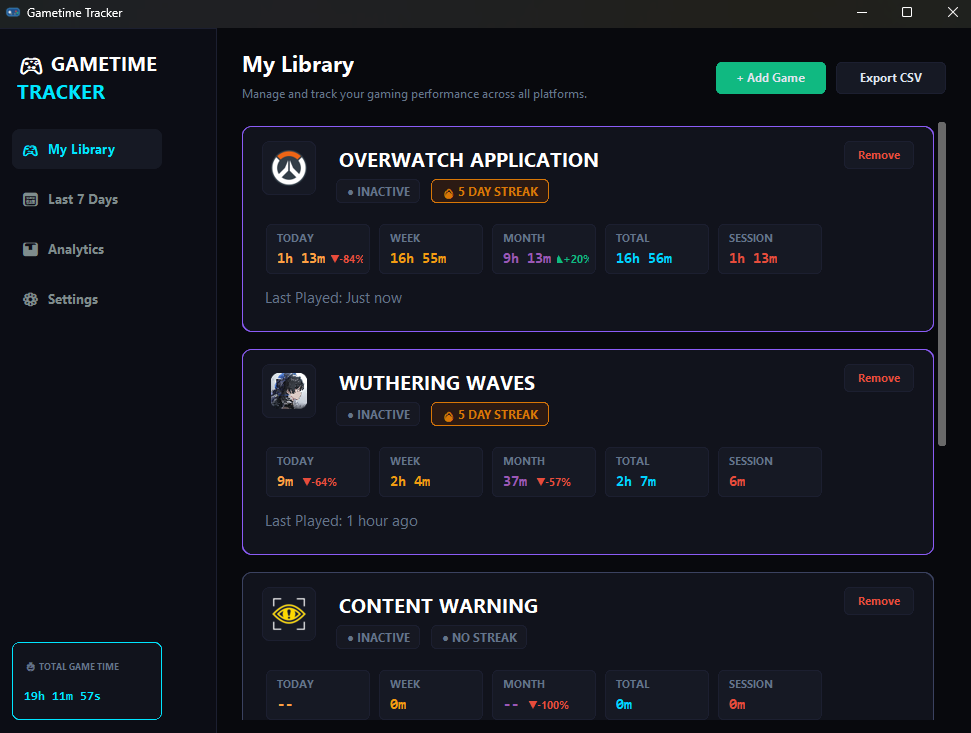
Gametime Tracker runs silently in the background, auto-detecting your gaming sessions across Steam, Epic, Xbox, and standalone titles.
Privacy Focused (100% Offline) Zero CPU Overhead
Gametime Tracker Application UI Screenshot
01

Engineered for Players

Automatic game detection, daily streak tracking, and complete offline privacy — all without lifting a finger.

Automatic Process Detection

No start/stop buttons. The lightweight monitor scans active Windows processes and matches them against database libraries. Tracking initiates the exact millisecond you boot a game and ends when you close it.

Daily Gaming Streaks

Build consecutive day streaks by launching your library daily. Maintain consistency or track breaks to manage a healthy balance.

14 Days Active Streak

Local & Offline First

Zero cloud uploads. All sessions are compiled locally into a secure SQLite database on your hard drive. Your data is 100% private.

gametime_tracker.db
02

Three Steps to Insight

Install, play, and watch your stats populate automatically.

01

Launch Client

Download and open Gametime Tracker. The app automatically starts in the background and collapses to your Windows system tray, using less than 50 megabytes of RAM.

02

Play Your Games

Boot up any game executable. Whether it's an indie game launched directly or a AAA blockbuster from Steam or Epic, the tracking agent detects and records it.

03

Analyze History

Open the main UI at any time. Review session lengths, check daily streaks, evaluate weekly aggregates, and export CSV logs for granular analytics.

📌

Sometimes the app won't automatically detect your game , but you still can add it manually :)

03

See It in Action

Interact with our live web simulator to see how the background engine logs play times.

Simulator Control Panel

Choose a game to simulate launching. The simulator will match how the desktop application registers playtime, accumulating session duration and updating totals.

System Tray Logs
[System] Ready to simulate game launch.
GAMETIME TRACKER
TOTAL GAME TIME19h 11m 57s
My Library
Manage and track your gaming performance across all platforms.

OVERWATCH APPLICATION

INACTIVE 5 DAY STREAK
TODAY
1h 13m ▼ -84%
WEEK
16h 55m
MONTH
9h 13m ▲ +20%
TOTAL
16h 56m
SESSION
1h 13m
Last Played: Just now

WUTHERING WAVES

INACTIVE 5 DAY STREAK
TODAY
9m ▼ -64%
WEEK
2h 4m
MONTH
37m ▼ -57%
TOTAL
2h 7m
SESSION
6m
Last Played: 1 hour ago

Start Tracking Today

Gametime Tracker is completely open-source, free, and keeps your data 100% local. Supported on Windows 10 and 11.

Download for Windows v1.0.0 Stable (Win 64-bit)

Lightweight Installer

Self-contained binary. No bloatware or heavy framework runtimes.

Local Database Storage

SQLite storage guarantees you own your tracking data forever.

No Cloud Accounts

No email log-in, no internet connection, and zero telemetry required.